Gravity Forms Gated Content

Download Gate for Gravity Forms

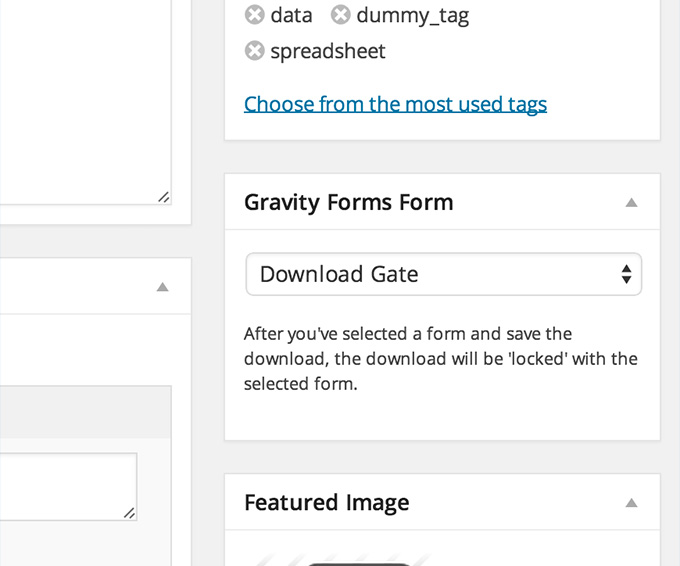
Simply open the downloads you would like to be locked with a Gravity Forms form and select a form.

Downloads with a form attached will only be accessible after the form is successfully completed.

Download PDFs only after a Gravity Forms form submit

Easily create a download gate for your files.

Couple with our Email Notification extension and get immediately notified when a Gravity Form has been submitted. Great for timed follow-ups.

⭐⭐⭐⭐⭐
Brian Smith
We’ve been using Gravity Forms in conjunction with Download Monitor for the past months and couldn’t be more pleased. Our sales team has set up a few GF forms that users have to fill in to receive access to our white paper.

We’ve combined this with the Email Notification extension and our sales team now has a very efficient system, where they can follow up with our leads 2-3 hours after they’ve got access to the downloadable file.
14-day money-back guarantee, love it or get a full refund.

Export Gravity Form to CSV

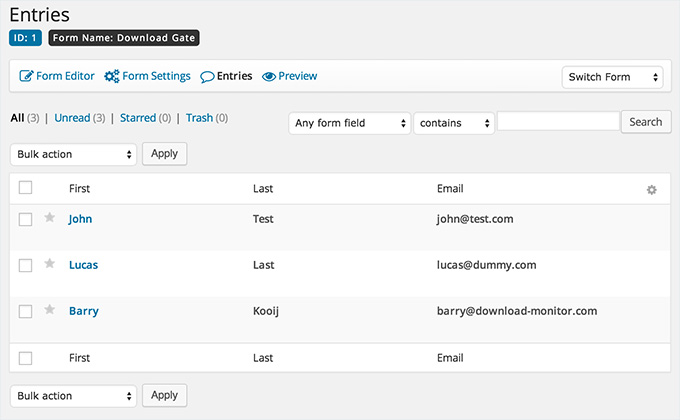
Entered data is stored to your Gravity Forms form like with your other forms, entries are easily exportable to a .csv file.

The Gravity Forms extension requires the Gravity Forms plugin installed and activated to work.

1-click export your Gravity Forms gated content entries as .csv

Import content into your favorite CRM or marketing automation tool

Export entries in a format that your preferred email marketing provider understands

No shortcode hassle

The Gravity Forms extension adds an easy-to-use shortcode that will display the form wherever you want.

The shortcode only generates the form, giving you absolute freedom to build your own awesome download pages.

2 minutes or less setup

Frustration-free implementation

Compatible with all known page builders, including Gutenberg, Elementor, Divi, and more.

Frequently Asked Questions

Have questions? These are some frequently asked questions, but, if your question is not listed feel free to check our documentation or contact us.

Anyone with a WordPress website that is looking to generate more leads, sell digital products or protect their digital files against unauthorized downloads.
To use Download Monitor on your website, you need is a self-hosted WordPress.org installation or a website hosted on WordPress.com’s Business Plan.
Yes, of course! You are welcome to ask us any questions you may have on our contact page here.
No, not at the moment, Download Monitor is a WordPress plugin and so it will not work with any other platforms like Shopify, Wix, Drupal, Joomla or Squarespace – to name a few.
You can easily create and customize your entire store without writing a single line of code. If you are a developer and want to customize the plugin, we’re definitely not stopping you or standing in your way.
Download Monitor will without a doubt not slow down your website. We built Download Monitor for performance from the ground up and have thoroughly tested it to ensure that doesn’t adversely affect your website’s performance.
Yes, any license you purchase can be used on a client’s website, if you’re handling the payment. If not, you can sign up as an affiliate and refer your client, so you get 20% as a (recurring) commission for recommending a great product to them. 😎
All license keys are valid for 1 year from the purchase date. An active license key is needed for access to updates and support,
We take pride in offering stellar support. So, in the unlikely event that you do run into any issues with Download Monitor – let us know!.
We have a 14-day refund policy that’s awesome: if for any reason you’re unhappy, get in touch.
⭐⭐⭐⭐⭐
Christina W.
Download Monitor and Gravity Forms make for a killer combo. Our sales team can now follow up immediately after a form has been filled in and close the sale.

Lead gen freebie + phone follow-up = 26% more sales for us. Couldn’t be happier!
14-day money-back guarantee, love it or get a full refund.